The Modifier Utility
Downloads

The Modifier Utility |
"S.T.A.L.K.E.R. - SoC" Stuff Downloads |
|
The ZRP Modifier Program
While many of the The Zone Reclamation Project's features can be configured with Notepad, the included Modifier program can be used to customize your game with ease.
Don't like head bobbing? Want to change the time limit on quests? Or perhaps you liked Snitch's chatter, and want to turn it back on (ZRP 1.05; it's on by default in 1.07). You can do that here.
Special Smart Mod Manager Note:
If using the SMM, you need to configure the ZRP before installing the archive via SMM. The Smart Mod Manager changes the spacing and removes comments when it merges mods with the vanilla files, and the Modifier is looking for exact matches in some cases. In other cases, SMM doesn't copy the original file to the STALKER installation directory because it is the same as vanilla (prior to configuration).You can also manually copy files and/or edit the configuration files that report mismatches. In the future, configuration files that take this into account will be released.
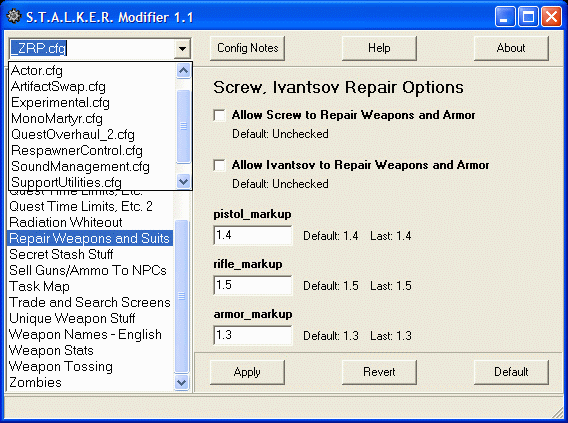
The Config Notes button will display help in your text editor for the specific configuration file selected in the drop-down combobox at the top left. The Help button brings up general help for the Modifier program. Some options in ZRP 1.05 Test R10
You can Apply your changes, you can Revert to the original form (warning: might undo other file-related changes) and you can restore the Default ZRP settings for each individual entry.
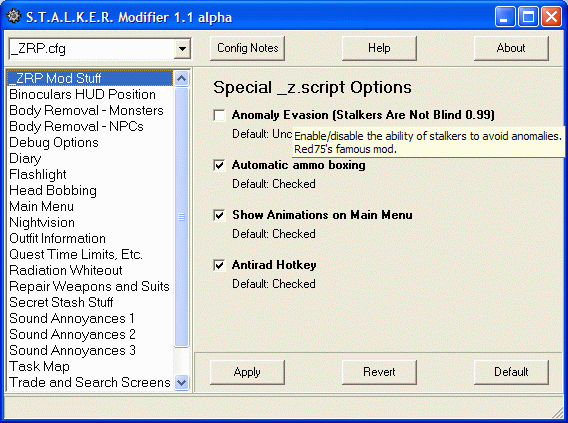
Hover the cursor over a field or checkbox text to see a pop-up hint about the option.
You can have both checkboxes and fields for the same entry. ZRP 1.07 has many more entries than 1.05
The Modifier program uses simple text files containing MS-DOS INI-compatible configuration data. ZRP 1.05 has four, while version 1.07 R5 has fourteen. Note the different configuration files in the dropdown combo box in the upper left of the example image.
You can easily make your own to help you tweak your custom settings. In fact, modders are encouraged to do so; the Modifier program can be freely distributed with mods based on the ZRP. For an example, see the InGameCC mod (adds captions to cutscenes, etc.) by Mr. Fusion and TSL16b.
Here are the configuration files with entry headings as of ZRP 1.07 R5. Except where noted, all tweaks and configuration options were authored by NatVac._ZRP.cfg:
Actor.cfg:
- _ZRP Mod Stuff -- IG2007's ammo boxing, Red75's anomaly evasion -- see image above
- ABC Sleeping Bag -- Enable sleeping bag, PDA alarm sound
- Autosaves -- Enable level-based autosaves, choose copy or rename
- Binoculars Position/Sound -- Choose old or new style, quieter operation
- Body Removal - Monsters -- Adjust time before removal
- Body Removal - NPCs -- Adjust time before removal
- Cases and Crates -- Control shard removal time, notifications
- Controller Effects -- Individually toggle red screen, double-vision, weaving
- Cursor -- Replace the circular empty-hand cursor with just a dot
- Cutscene Control - Fly-by -- Toggle Agroprom, Rostok, and/or Pripyat stadium fly-by cutscenes
- Debug Options -- Toggle debug mode, select displayable info
- Diary -- Ergonomic link position option
- Flashlight -- optional longer reach but less bright
- Earthquake Prevention -- You can skip the periodic shake at the NPP
- Fire Illumination -- EggChen's famous dynamic campfire lighting tweak
- Head Bobbing - Part 1 -- Install the head-bobbing config file if needed (PiIsARational)
- Head Bobbing - Part 2 -- Tweak the amount of head shaking while you walk
- Inventory Grid Size -- Smaller ZRP cell size or vanilla
- Knife -- Adjust reach, volume of strike sound
- Main Menu -- Another ergonomic option
- Marked One's PDA Marker -- Smaller cyan marker makes it easier to view secrets
- New Game Tweaks -- Bypass Sid's speech, starting tutorial, set save game prefix
- New Game Tweaks 2 -- Install skippable version of Sid's speech
- Nightvision Quality -- You can have all-good nightvision
- Nightvision Sound -- Silence the looping sound, and even the start/stop sounds
- Night Music -- Enable additional Mooze music between midnight and 6 a.m.
- Outfit Information -- Know the suit parameters before you buy
- PDA Notice Icon - NonWS -- The PDA icon can be solid, blinking (default) or hidden
- PDA Notice Icon - WS -- Same as above for widescreen users
- Quest Time Limits, Etc. -- Set quest time limits, display reward info, bypass unwanted sidequests
- Quest Time Limits, Etc. 2 -- Disable/enable autoquests
- Radiation Whiteout -- Enable/disable white noise in radiation field
- Repair Weapons and Suits -- Toggle the Duty/Freedom mechanics' repair ability, set pricing.
(NatVac, BobBQ, motiv-8, Mr. Fusion, from Shebuka idea)- Secret Stash Info -- Know what level has the stash and when the stash is emptied
- Sell Guns/Ammo To NPCs -- Allow NPCs to use better weaponry - sell them ammo too
- Task Map -- Yet another ergonomic link position option
- Time on HUD -- Toggle the display of the time on the HUD
- Trade and Search Screens -- Smaller, denser grid options for less scrolling (NatVac, fitzroy_doll)
- Unique Weapon Stuff -- You can keep unique weapons from deteriorating or jamming
- Weapon Names - English -- Use real-world names for the weapons (MrSeyker)
- Weapon Stats -- Show the actual first-shot accuracy of each weapon
- Weapon Tossing -- When NPCs die, they can toss their weapons or store them in their backpacks
- Zombies -- Treat them like normal enemies on the minimap
- ZRP Legacy -- Restore older ZRP version of secrets
ArtifactSwap.cfg:
- * Install Actor.ltx * -- If you don't already have the files
- _Mod Compatibility -- If you change system.ltx, make it match your patch
- Camera Viewpoint -- Move Marked One's eyes above his chest
- Carry Weight -- Configure how much you can carry
- Climbing -- Control your ability to climb over small obstacles
- Difficulty - Part 1 -- Determine your innate vulnerability
- Difficulty - Part 2 -- Set the AI accuracy for all difficulty levels
- Difficulty - Part 3 -- Configure Marked One's contribution to accuracy (new in R5; entry by MrSeyker)
- Endurance - Part 1 -- Adjust stamina rate of loss and rest recovery
- Endurance - Part 2 -- Tweak exhaustion transition points
- Enemy on Radar -- Reduce or increase the persistence of the red dots
- HUD Cursor -- Crosshairs too big? Fix that here
- Hunger -- Modify how fast you get hungry
- Item PickUp -- Set the detection and pick-up ranges (new in R5; entry by MrSeyker)
- Jumping -- Frustrated because you can't clear a knee-high wall? Not any more
- Radiation -- Change the rate of damage from radiation
Experimental.cfg:
- Artifact Swap -- Enable this minimod, then visit Skinflint to exchange artifacts and money for better ones
- Skinflint Pricing -- Friendship with Freedom can affect what he'll pay for artifacts and mutant parts
- Surprise Boxes -- Enable a small chance of finding something good in certain containers.
Experimental_AI.cfg:
- Alternative Pripyat Gulag -- Alex-Tommy tweak to limit certain smart terrains to baddies
- Explosives Carry - Light -- Toggle the ability to carry explosives weighing up to 40 kg
- Explosives Carry - Heavy -- Toggle the ability to carry (well, lift) heavy explosives
- Explosives Weight - Light -- Adjust the weight of explosives normally weighing up to 40 kg
- Explosives Weight - Heavy -- Adjust the weight of heavy explosives
- NPP Blowout Timer -- Change the default six minutes to whatever you want
- Psi Emitter -- Choose telepathic damage or rupture damage
- Weapons -- Tweak hit_probability_max_dist, silencer damage/accuracy
- Weather -- Restore the sun with all-good weather, or turn off lightning bolts
- Weather Sound Fix -- Maintain the sound of rain when changing levels
FirstPersonShooter.cfg:
- * Grenadier by xStream * -- Install ZaGaR's tweak of the NPC grenade-throwing mod
- * Live Stalker Ranking * -- Install Mr. Fusion's AI rank tweak
- * Rulix AI / xStream's AIPack Install * -- Install either, both, or restore ZRP default
- AIPack - NPC Armor Use -- Disable/re-enable outfit/rank changing
- AIPack - Grenadier NPCs -- Disable/re-enable grenade throwing (ZaGaR's tweak)
- AIPack - NPC as Medics -- Disable/re-enable NPCs healing themselves, others
- AIPack - Body Removal -- NPCs can move corpses away from the camp
- Rulix - Misc Configuration -- NPCs can heal themselves, use scopes
- Rulix - NPCs Attach Addons -- NPCs can attach addons to their weapons that support them
- Rulix - NPCs Avoid FF -- Finally, NPCs care that folks are in their line of fire
- Rulix - NPCs Use GLs -- Weapon-attached grenade launchers now usable by NPCs
- Rulix - NPCs Melee -- Close-quarters means hand-to-hand combat
- Rulix - NPCs Reload Early -- They don't have to wait until the weapon is empty
- Rulix - NPCs Can Self-Heal -- NPCs can apply bandages in an animation
- Rulix - NPC Weapon Manager -- An NPC weapon selection option
- NPC Sawn-Off Fix -- Lets sawn-off-wielding NPCs choose a better weapon if available
- NPC Smart Flashlights -- NPCs can turn off their flashlights if they spot enemies
- NPC Use Single Item Rule -- Control whether NPCs can carry more than one rifle
Freedom Vs. Duty.cfg:
- * Install First-Person Shooter * -- Set up the game to act more like an FPS
- NPC Accuracy - Part 1 -- Adjust the odds NPC shots will strike your hitbox within hit_probability_max_dist
- NPC Accuracy - Part 2 -- Set the hit_probability_max_dist distance value
- Your Accuracy -- Control your contribution to accuracy when standing, moving, crouching, aiming
- Ammo Drops -- Enable scavenger mode, tweak amount of ammo found on bodies
MonoMartyr.cfg:
- Freedom Vs. Duty -- Allow or prevent joining Duty and/or Freedom (MrSeyker)
- Faction Relationship Tweaks -- Change relationship defaults to support your membership (MrSeyker)
QuestOverhaul_2.cfg:
- MonoMartyr Spawn Control -- Allow/prevent spawning of really tough enemies, set quantities
- Enable Early -- If allowed, you can add them to the game before the normal endgame
- Notification Options -- Know when they are around, and/or get death notices, info
RespawnerControl.cfg:
- Quest Overhaul Options -- Enable Decane's Quest Overhaul with NatVac Extensions
SoundManagement.cfg:
- Frequent Respawns -- Adjust the replacement rate for fast respawners
- Medium Respawns -- Modify the moderate rate
- Seldom Respawns -- Set min/max for the slowest respawners
- Respawn Tools -- Show spawning debug info, or emulate vanilla spawns
SupportUtilities.cfg:
- Background Sounds -- Reduce the frequency of ambient noises and effects
- NPC Chatter Control -- Keep the new method, or use either vanilla or vanilla emulation
- Sound Annoyances 1 -- Silence the Bar chatter for the new or emulation methods
- Sound Annoyances 2 -- Silence the chatter of Voronin, Petrenko, Sakharov
- Sound Annoyances 3 -- Reduce the battle sounds at Pripyat
Tweaks.cfg:
- Enable ZRP Support Utilities -- Permit access to the ZSU dialog from the main menu with Z.
Note that none of the following items will appear in the dialog until installed!- Execute Script Command -- Execute functions, change variables while in the game
- Faction Management -- Fix faction problems (even in the Bar), join/leave certain factions
- Fix Broken Doors/Switches -- Repair doors/gates/switches, remove doors
- Fix Broken NPCs -- Reset stalkers suffering from Zone fugue
- Give Yourself Money -- On your own head be it
- Info_portion Set/Reset -- Custom tweak your progress, fix bugs
- Mark NPCs and Items -- Mark by character or object name (full/partial), mark Dutyer weapon and some NPCs
- Remove Pripyat Anomalies -- Switch certain AI killer anomalies off before the endgame
- Repair Weapons/Armor -- While useful for testing, this cheat can be a fun-killer
- Secret Script Stuff -- Force secrets from next body searched if available, pre-fill stashes
- Spawn Tools -- Spawn anything spawnable, including an invulnerability artifact, new mutants
- Temporary Weather Reset -- A workaround for the flashing triangles
- Variable Watch -- While playing, you can enter a variable or function and display the real-time result onscreen
Vanilla.cfg:
- * Install alife.ltx * -- If needed by the next items
- Alife.ltx Tweaks -- Preset the start time/date, adjust autosave frequency
- Alife.ltx Tweaks - Advanced -- time_factor, switch_distance, objects_per_update
- Free Play Tweaks -- You can start a free play game with just a knife
- Flashing Disk Icon -- Stop disk icon from flashing in lower right corner
- Item Healing -- Adjust or remove the healing effects from consuming food (MrSeyker)
- Item Healing Part 2 -- Tweak medkit bleeding reduction amounts (MrSeyker)
- General -- Disable TZIO chapter selection/teleport, intra-level jumps, free play option
- Body Removal - Monsters -- Same as elsewhere but with vanilla defaults
- Body Removal - NPCs -- Ditto
- Body Search -- Restore vanilla bug, "multiple secrets from same body" exploit
- Extra Level Changers -- Disable new progress-based level changers
- Inventory Grid Size -- Same as elsewhere but with vanilla defaults
- NPC Use Single Item Rule -- Ditto
- Psi Emitter -- Ditto
- Quest Time Limits, Etc. -- Ditto
- Secret Stash Info -- Ditto
- Time -- Ditto
- Trade and Search Screens -- Restore vanilla versions
- Wounded and Their Weapons -- Restore vanilla exploit
Last page update: January 11, 2016
Copyright (C) 2007-2016 Metacognix. All rights reserved.